
Welcome to Canterbury Astronomical Society › Forums › Canterbury Astronomical Society Forums › CAS Members › New Feature: Inline Images
- This topic has 3 replies, 3 voices, and was last updated 7 years, 7 months ago by
 Anonymous.

- AuthorPosts
- June 13, 2018 at 12:50 am - Views: 114 #611
 CAS WebsiteKeymaster
I enabled a new feature today…. Inline images
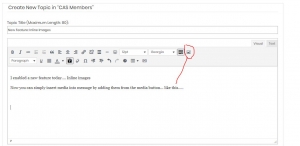
Now you can simply insert media into message by adding them from the media button… like this…..

Click the icon and a pop up box appears

You can drag and drop from a folder onto the box or click anywhere in the box and browse to a folder and select the image and enter
It will upload and include the image in the message
You can change the alignment of the image from left right or center, or flow text round it
You can also click the image and resize by dragging the corners!
There is also a lightbox feature that means clicking on an image in a posting will pop up a copy of that image into a new window using a lightbox style pop up.
Hope you enjoy the new feature 🙂
Kind regards
Simon
-
This topic was modified 8 years, 4 months ago by CAS Website.
June 13, 2018 at 1:02 am - Views: 372 #613Dale KershawModerator
testing
June 13, 2018 at 1:03 am - Views: 347 #614CAS WebsiteKeymasternice Dale – thanks for testing that 🙂
February 20, 2019 at 5:35 am - Views: 363 #1249AnonymousInactivePing
-
This topic was modified 8 years, 4 months ago by
- AuthorPosts



- You must be logged in to reply to this topic.