
Welcome to Canterbury Astronomical Society › Forums › Canterbury Astronomical Society Forums › Astrophotography › New Rig ready to go
- This topic has 2 replies, 2 voices, and was last updated 7 years, 1 month ago by
 CAS Website.

- AuthorPosts
- August 24, 2019 at 8:55 am - Views: 122 #1904
 CAS WebsiteKeymaster
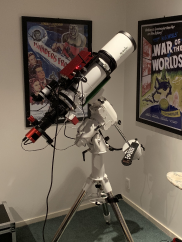
Hi Guys. As you might remember I was setting up a new rig for AP. I have owned an SCT for the last 2-3 years but had been using it for visual only. After doing a bit of research, I decided I wanted to get a triplet APO refractor along with dedicated camera equipment and learn to image. Well it is now complete!
My set-up consists of the following equipment;
- SW EQ6-R EQ mount
- SW Esprit 120mm APO Refractor with Corrector
- ASI1600 MM cooled camera for main imaging
- ZWO EFW with 7x 36mm filters (LRGB + Ha + OII + SIII)
- ASI290 Mini with OAG
- Primalucelab Sesto Senso focuser
- Primalucelab Eagle 3 (basic)
- Primalucelab Dew heater for main imaging scope
- 100A/h AGM battery
Buying all this was the easy part. I am now trying to figure out how to use all the equipment! So far I have set up the remote connection from my PC, Installed relevant drivers, Sharpcap Pro and SGP to the Eagle, set up the set-up profile in SGP and taken a few ‘test’ images in the form of .fit files which I cannot view on my PC (I’m taking it that I need to convert these files).
It is all very slow going as I obviously have little AP experience and no experience with some of the software (Sharpcap, SGP & PHD2). Ideally, I’d love to figure it all out on my own but unfortunately, feel this might take years and require a few replacement PC screens! So this is where I’m reaching out to you good folk and asking for assistance.. is there anyone with some experience that can spare a little time to show me how to navigate the software, plate solve etc? Unfortunately I do not have a laptop at the moment but this will hopefully be the next purchase (along with APP or PI ???). I currently live in Ilam fyi.
Picture below of my new rig
Thanks for reading 🙂 Daniel
 August 24, 2019 at 9:50 am - Views: 380 #1905CAS WebsiteKeymaster
lovely Daniel
sure can I’ll be in touch via FB 🙂
August 24, 2019 at 10:25 am - Views: 364 #1906CAS WebsiteKeymasterGreat chatting tonight Simon. Thanks for the help
- AuthorPosts
- You must be logged in to reply to this topic.